
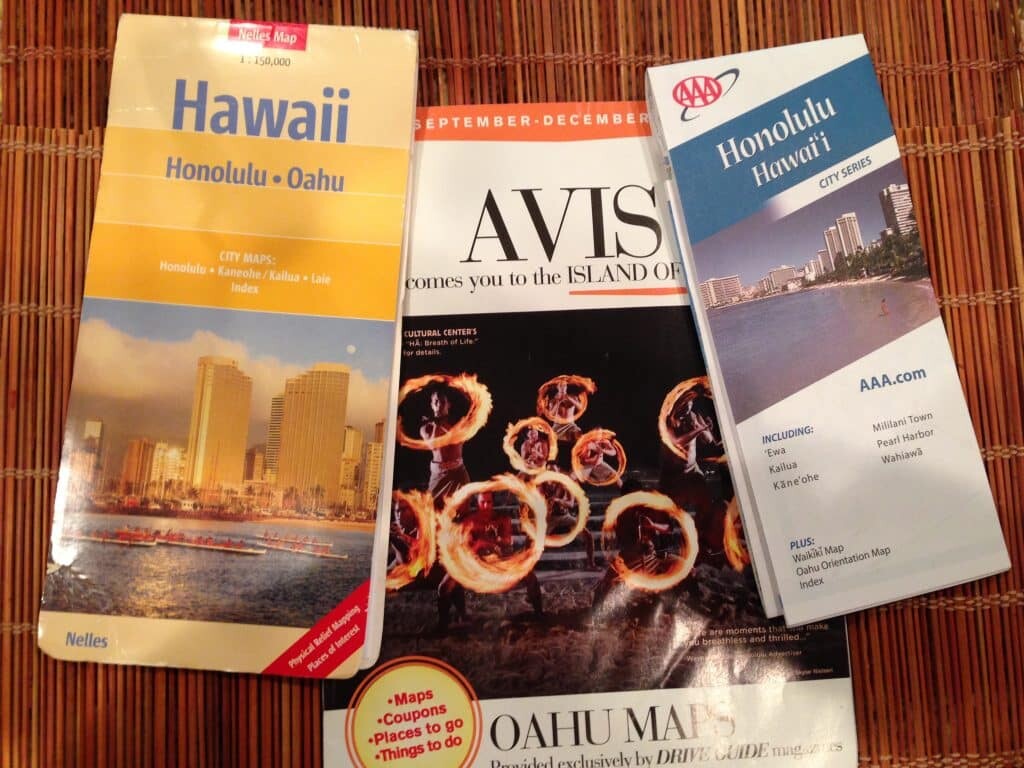
It’s a good idea to start getting familiar with the geography and streets of Oahu before your feet touch the island ground. Where do you find a useful Oahu map? Here are eight resources to help you find your way around Oahu.
1. Download or order your free Oahu vacation planner from the Oahu Visitors Bureau. From this link you’ll be able to access and order Oahu brochures that are loaded with useful maps. These guides are very useful to help you start understanding the lay of the land.
2. Purchase a driving map of Oahu through Amazon.com or at your local book store. We used to recommend the Nelles Map Hawaii: Honolulu – Oahu, but it doesn’t appear that this map is still in print. It appears that this Reference Map for Oahu is a good one. Additionally, though not a map per se, Oahu Revealed offers many detailed maps of interest to tourists through out this travel guidebook.
3. When you arrive at the Honolulu Airport, stop at one of the information desks and politely ask for a map of Oahu. My only caution is that the information desks are not always manned. The free maps that they provide are really the best Oahu vacation maps that I’ve found. Most of the major scenic points are well labeled. The only downside to the maps is that there isn’t a great deal of street detail.
4. If you have AAA, stop into one of their offices near your hometown and request free driving maps. They offer a very detailed map of Honolulu.
5. Of course you can always use online maps like Google Maps, Bing Maps, etc. to print driving directions.
6. If you have a portable GPS navigation system, do bring it with you to Oahu. Andy and I first brought ours last year and it saved us lots of aggravation and time. I am convinced that we were able to see more of Oahu because we brought the navigation system. (See my post on using a GPS navigation system in Hawaii.) Mobile phone map apps can be useful too if you have mobile phone service/coverage.
7. If you are renting a car, the agency provides a free driving guide. These drive guides can be useful if you have the patience to find the pages with the maps in between multiple pages of advertisements. (Sometimes, they do have good coupons, though.) This link should lead you to the current Oahu drive guide that’s being distributed.
8. Ask the staff at your hotel if they have maps available.
Now, having listed all those resources for maps and navigating Oahu, guess which ones I use. Would you believe that I use a combination of all of them? I really do. How about you? What map and navigation resources do you recommend for sightseeing on Oahu?

 Sheila Beal


12 comments
GPS is the only way to go. Hawaii is so confusing, no road signs, especially in the more rural areas and makes you just want to rip your hair out! A map would be necessary just in case the GPS wants to send you out in the ocean or something weird. :>) First trip we didn’t have GPS and spent most of the time lost and confused. Second trip we had GPS and it was so much better. We did drive back and forth on H3 three times because the GPS was confused about how to get us off…. but hey, H3 is one beautiful drive so we didn’t mind!
For driving on Oahu, we’ve used a combination GPS, AAA map and the free guide maps. The GPS is really helpful in Honolulu because the street names look so similar (Kapahulu vs Kapiolani) when you’re trying to read the signs while driving. Plus, their pronounciation is a hoot sometimes!
The AAA street map is good, but it’s hard to read the detail due to the small print. The free guide maps are good for a big picture view.
Sites with Oahu maps:
http://www.tripadvisor.com/Travel-g29222-c120226/Oahu:Hawaii:Maps.html
thank God i brought my laptop and just used google map. you just have to plan ahead where you are going for that day. then remember the landmarks. i surely agree with you the streets are confusing not only that the street names are so small. but take it as an adventure. we got lost so many times. as long as the tank of gas is full we are fine.
When you say take a GPS , is a cellphone that can do directions adequate?
In our recent experience, a phone with GPS seems to work fine, except for brief lapses in very remote areas of Hawaii.
Thank you for the wonderful suggestions. I plan on using a GPS in the rental car. Speaking of rental cars. I want to rent a car just for one day while exploring the island of Oahu. The problem is parking. I will have it overnight and the place I am staying at (Polynesian Plaza) has not parking. We were told we could park the rental car a block away. Do you have any suggestion for Waikiki area parking.
Thank you.
Susan – check out this post for Waikiki parking suggestions: https://www.govisithawaii.com/2007/11/13/finding-reasonable-parking-in-waikiki/
Additionally, you might want to call the folks at Polynesian Plaza to ask them for their suggestions.
Order the Oahu Travel Planner Hawaii planner & planners for other islands also available) from Hawaii Visitors and Convention Bureau (HVCB) (U.S. & Canada only). It has good maps. Anyone can read the Oahu planner online.
http://www.gohawaii.com/visitor-guide
or
1-800-GOHAWAII
The Oahu Visitors Bureau has moved into the same office as the HVCB in Waikiki. The HVCB has hard copies of the Hawaii planner and the Island of Oahu planner available for any walk-ins. They often have hard copies available for the other islands.
Located in the Waikiki Shopping Plaza:
Hawaii Visitors and Convention Bureau
2270 Kalakaua Avenue, Suite 801
Honolulu, HI 96815
Dave- we’ve already linked to the Oahu Visitors Bureau resources in point #1.
Sheila, I know that. I just wanted to expand the info so anyone from any country knows they can get the info as soon as they arrive and to add the address.
OK. I see now. I was really confused wondering if perhaps you didn’t see our number one point. 🙂